Introduction
Real-time AI Bible verse detection for live sermons and broadcasts — a Tauri v2 desktop app with a React frontend and Rust backend.
Litdeck listens to a live sermon audio feed, transcribes speech in real time, detects Bible verse references — both explicit citations and quoted passages — and renders them as broadcast-ready overlays via NDI for live production.
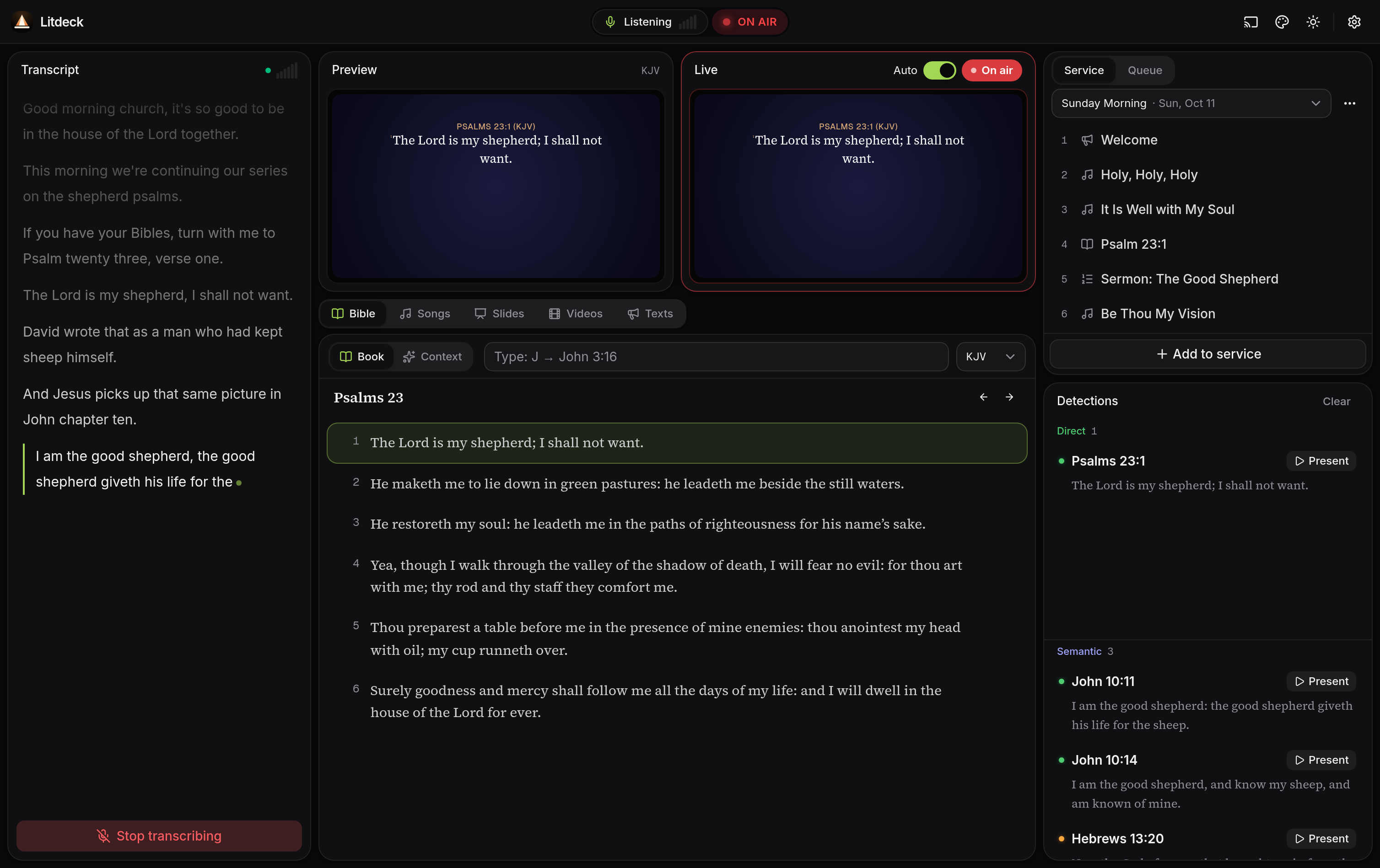
The Litdeck dashboard during a sermon. The transcript runs down the left; Preview and Live sit above the Bible, Songs, Slides, Videos and Texts tabs in the centre; the service order and the verses detected from the sermon are on the right. Click to expand.
What you can do with Litdeck
Hear the sermon
Capture audio from any input device and transcribe it locally with Whisper or via Deepgram's streaming WebSocket API.
Find the verse
A multi-strategy detector combines Aho-Corasick reference parsing, Qwen3 ONNX semantic search, and quotation matching.
Render broadcast overlays
Send verse overlays to vMix, OBS, or any NDI consumer with the built-in theme designer for typography and backgrounds.
Switch translations on the fly
Say "read in NIV" mid-sermon and Litdeck swaps the active translation without breaking the queue.
Download the app
Windows
Download the latest Windows installer — from the latest release. It is unsigned, so Windows SmartScreen warns on first run (More info → Run anyway).
The Bible database and AI models are not bundled with the installer. Build from source below if you want verse detection and local speech-to-text. macOS and Linux have no prebuilt binary yet — build from source there too.
Build from source in two commands
Prerequisites
You'll need Bun, the Rust toolchain, Python 3, and your platform's Tauri v2 prerequisites installed first. See Prerequisites for the full list.
git clone https://github.com/Thoobi/Kerst.git && cd Kerst
bun install && bun run setup:all
bun run tauri dev
That's it. setup:all runs seven idempotent phases — Python venv, Bible
downloads, SQLite build, ONNX export, embeddings — and tauri dev boots the
desktop app. See the installation guide
for a guided walkthrough.
How it's built
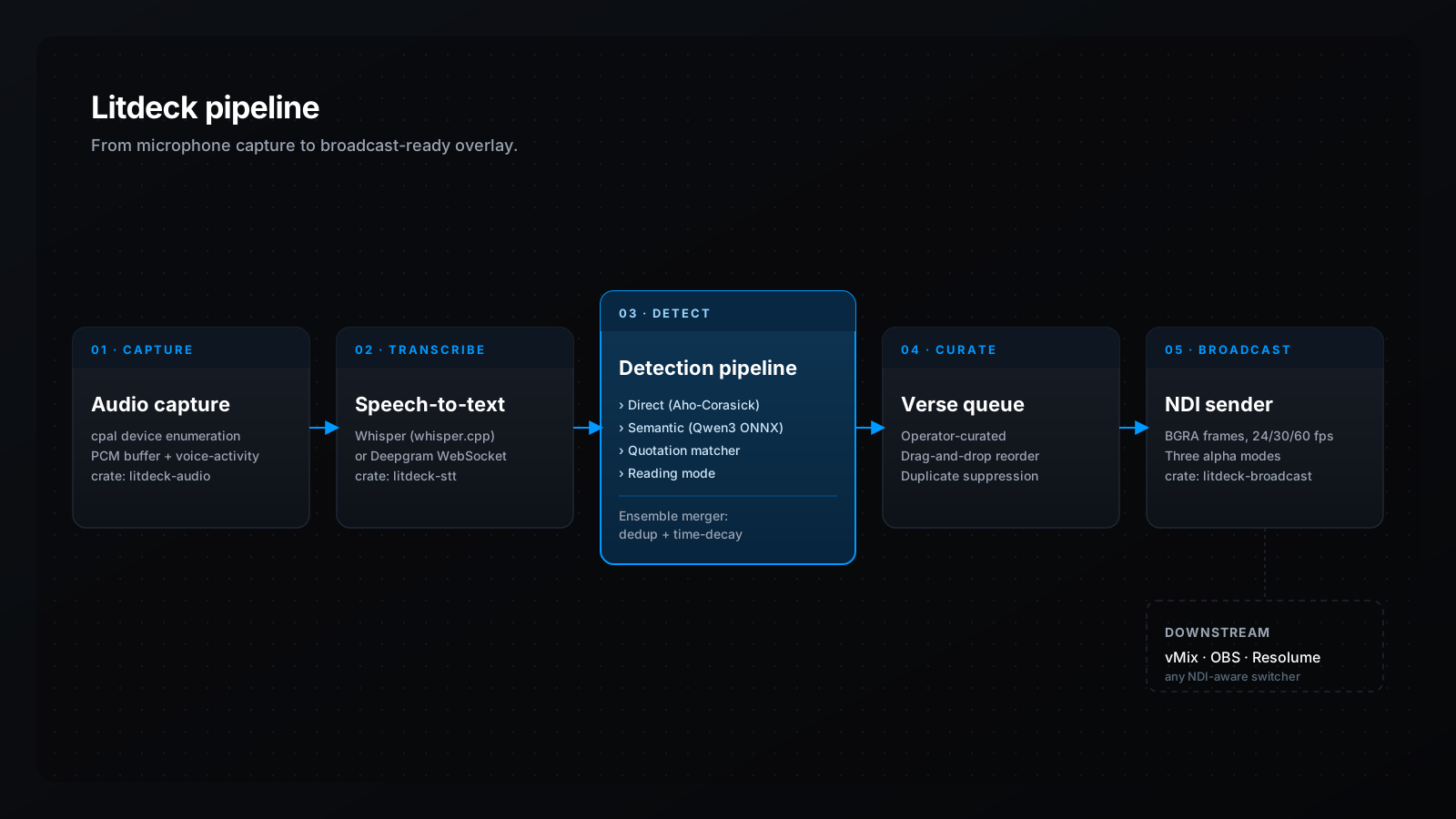
The five stages, in order: capture → transcribe → detect → curate → broadcast. The detection stage is the one that runs all four strategies in parallel and merges them. Click to expand.
Rust workspace, 7 crates
Audio capture, STT streaming, Bible DB, detection pipeline, NDI broadcast, Tauri command layer.
SQLite + FTS5
Bundled rusqlite database with full-text search, BM25 ranking, and 340k+ cross-references.
React 19 + Tauri v2
Tailwind v4, shadcn/ui, and Zustand on the frontend; Tauri v2 with a restrictive CSP on the backend.
ONNX-quantized embeddings
Qwen3-Embedding-0.6B exported to INT8 ONNX with brute-force cosine similarity over ~31k verse vectors — fast enough on CPU without an HNSW index.